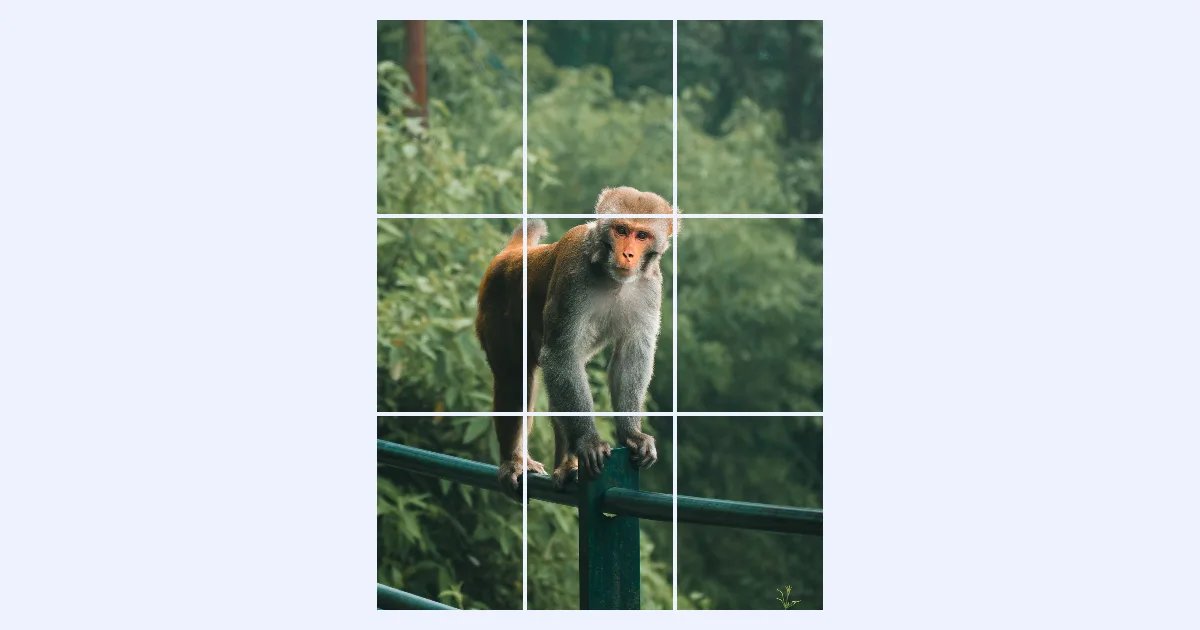
A "puzzle" or "grid" post spreads one picture across nine posts, so your profile shows it as one big image. It's a popular way to launch a product, announce an event or simply make a profile stand out.
It only works if every piece has exactly the right shape. This guide shows how to get that right with the image resizer and the image splitter, both of which run in your browser without uploading your photo.
The 30-second answer
- In the image resizer, make your photo exactly 3:4, for example 3240 × 4320 pixels.
- In the image splitter, choose 3 × 3 and download the nine pieces.
- Post them in reverse order: the last file first, the first file last.
The grid isn't square any more
Instagram's profile grid used to show square thumbnails. In January 2025 it switched to taller ones. When we measured Instagram's own profile on instagram.com on 18 October 2026, every thumbnail in the grid was exactly 3:4: 3 parts wide to 4 parts tall.
That's why old advice, cutting a square photo into nine squares, no longer lines up: each square would be shown with its sides trimmed.
So each of your nine pieces should be 3:4. A 3 × 3 grid of 3:4 pieces is itself 3:4 as a whole, so you start with a 3:4 photo.
Instagram changes its layout from time to time. Before posting all nine pieces, check how the first few look on your profile.
Step 1: make the photo exactly 3:4
Open the image resizer and add your photo. Then:
- Click the chain button between Width and Height to unlock the proportions.
- Type the size. Both numbers must divide by 3, and the height must be 4/3 of the width:
| Whole photo | Each of the 9 pieces |
|---|---|
| 3240 × 4320 | 1080 × 1440 (Instagram's full width) |
| 2700 × 3600 | 900 × 1200 |
| 1800 × 2400 | 600 × 800 |
- Keep Crop to fill selected. If your photo isn't 3:4 already, the resizer trims the edges evenly. To choose which part to keep, drag the frame in the Preview.
- Click Resize image and download it.
Choose the largest size your photo allows. The resizer won't enlarge a small photo unless you ask it to, so if your photo is smaller than 3240 × 4320, pick a smaller row from the table. In our example, a 1913 × 2551 photo became 1800 × 2400.
Step 2: split it into 9 pieces
Open the image splitter, add the resized photo, and click 3 × 3 under Grid. Each piece's size is shown on the picture and in the Regions list. In our example, all nine were exactly 600 × 800.
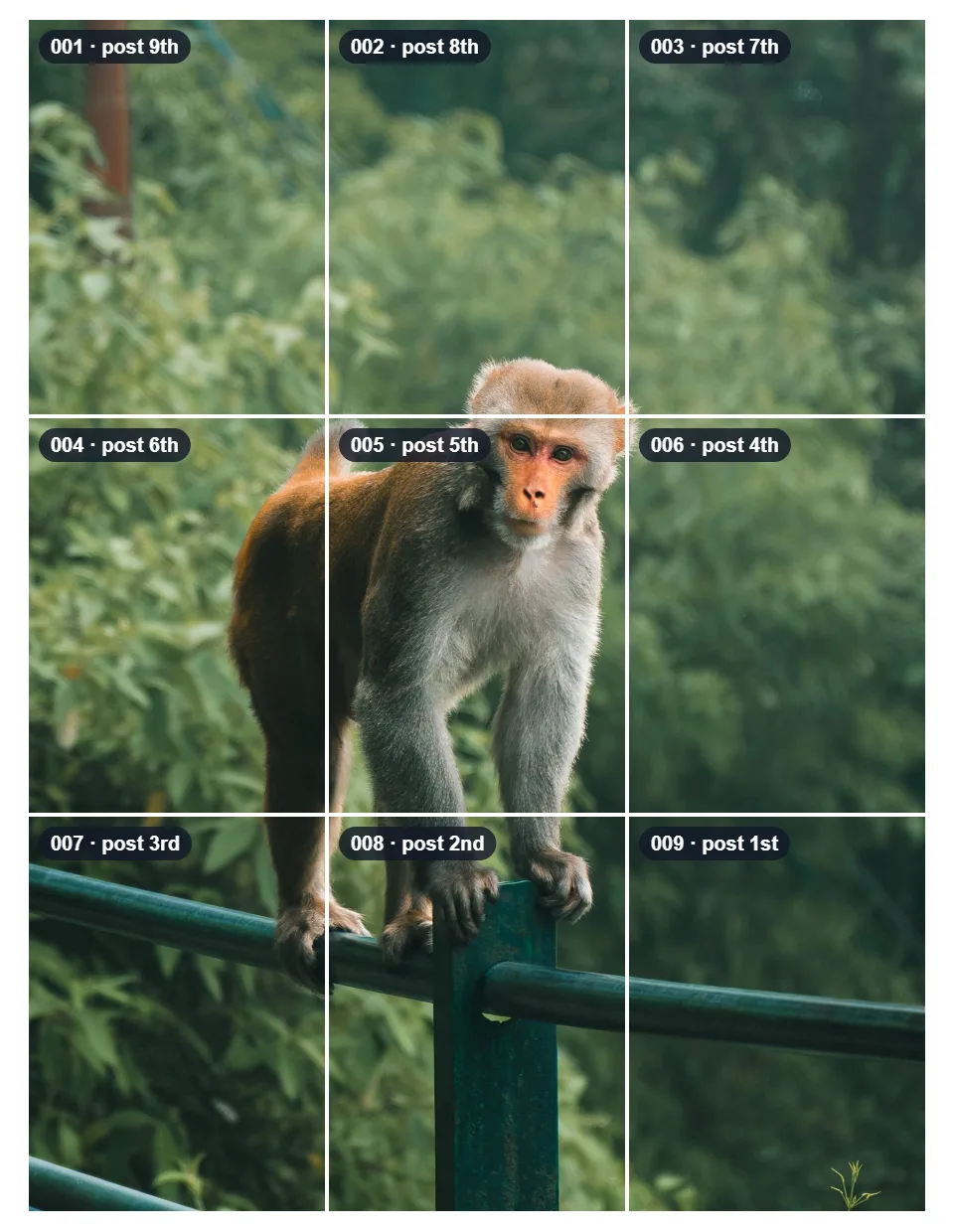
Click Download all as ZIP. The files are numbered in reading order, left to right and top to bottom: for example monkey-grid_001_1a.jpg to monkey-grid_009_3c.jpg. More about splitting in how to split an image into equal parts.
Step 3: post in reverse order
A new post appears at the top left of your profile and pushes the others along. So the piece that belongs at the bottom right has to go first, and the top-left piece last:
Some tips while posting:
- Keep the whole picture. When you add each piece, make sure Instagram keeps its original shape instead of cropping it to a square or 4:5. Several reports say some scheduling apps only accept shapes up to 4:5 and cut a strip off the top and bottom, which breaks the lines between pieces.
- Post all nine close together, so followers don't see a half-finished puzzle for long.
- Pinned posts are shown before all others in the grid, which shifts the puzzle. Unpin them, or plan around them.
- Later posts move the picture. Each new post pushes the grid along by one, so the image only lines up again after a multiple of three posts.
Other grid sizes
The same idea works for other layouts. Each piece should still be 3:4:
| Layout | Whole photo shape | Example size | Pieces |
|---|---|---|---|
| 3 × 1 (one row, a panorama) | 9:4 | 3240 × 1440 | 3 of 1080 × 1440 |
| 3 × 2 (two rows) | 9:8 | 3240 × 2880 | 6 of 1080 × 1440 |
| 3 × 3 | 3:4 | 3240 × 4320 | 9 of 1080 × 1440 |
Common questions
Why do the pieces look cropped on my profile? They're probably not 3:4. Check the size of each piece in the splitter's Regions list, and make sure the app didn't crop them when you posted.
Can I use a square photo? Yes, but a square photo split 3 × 3 gives square pieces, and the grid trims their sides. Make it 3:4 first in the resizer, with Crop to fill.
Do I lose quality by splitting? No. The splitter copies the pixels exactly; nothing is enlarged or blurred. JPG pieces are saved again at the quality you choose (90 by default).
Are my photos uploaded? No. The resizer and the splitter both run in your browser, on your own device.
Summary
- Instagram's profile grid shows 3:4 thumbnails, so each piece should be 3:4.
- Resize your photo to exactly 3:4, such as 3240 × 4320, with Crop to fill.
- Split it 3 × 3 and download the ZIP.
- Post the pieces in reverse order, 009 first and 001 last, keeping their full shape.