
You had a logo, an icon or a cut-out photo with a see-through background. You converted it, uploaded it or sent it to someone, and now it sits in a solid black or white rectangle. Worse, dark text in the logo may have vanished into a black background.
Almost every time, the cause is the same: the image was saved as JPG, and JPG can't store transparency. This guide explains what happens, which formats keep transparency, and how to convert images without losing it.
The cause: JPG has no transparency
A transparent pixel is a pixel with no colour at all. PNG and WebP files can store that. JPG files can't: every pixel in a JPG must have a colour.
So when a transparent image is saved as JPG, something has to fill the transparent areas. Some programs fill them with white, others with black, and a few with whatever colour they're set to. You don't choose; the program does. That's why the same logo comes back on white from one app and on black from another.
Here's a made-up logo with a transparent background, converted with the image converter. The squares show where the image is transparent:
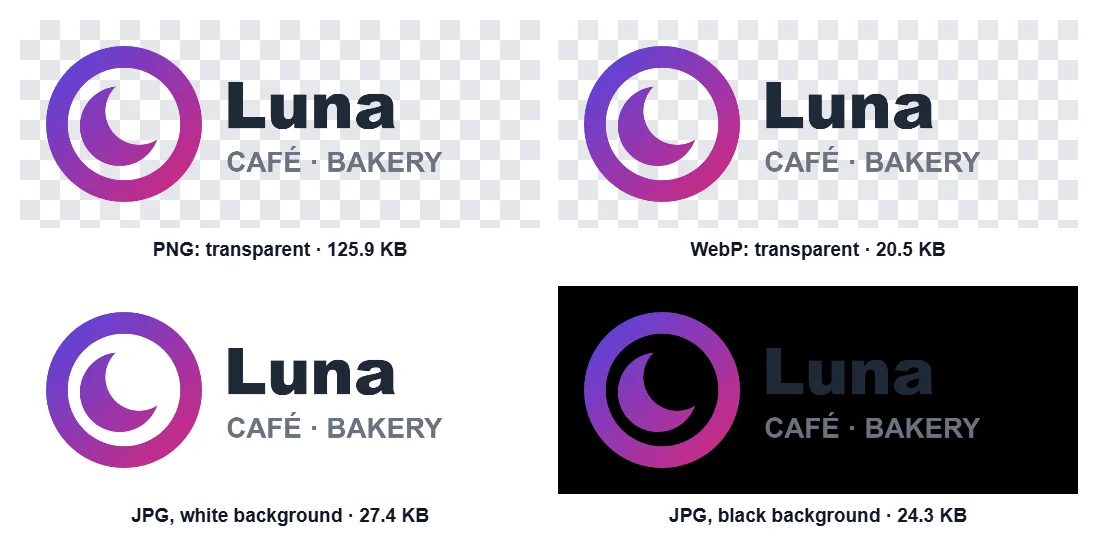
| Format | Transparency | File size |
|---|---|---|
| PNG (original) | Kept | 125.9 KB |
| WebP | Kept | 20.5 KB |
| JPG, white background | Filled with white | 27.4 KB |
| JPG, black background | Filled with black | 24.3 KB |
The JPG on black shows the real danger. The ring's transparent middle turned black, and the dark-grey "Luna" is now dark grey on black.
Other places transparency gets lost
Converting to JPG yourself is the most common cause, but not the only one:
- Uploading. Some websites, shops and apps convert uploaded images to JPG to save space. If yours does, upload a version with a background colour you've chosen yourself, so you decide what fills the transparent areas.
- Screenshots and copy-paste. A screenshot of a transparent image captures whatever was behind it, and some programs paste images without their transparency.
- The viewer, not the file. Some image viewers and dark themes show transparent areas as black. The file may be fine: open it somewhere else, or put it on a page with a light background, before you change anything.
Which formats keep transparency?
| Format | Transparency | Good for |
|---|---|---|
| PNG | Yes | Logos, icons, screenshots, anything with sharp edges. Lossless, so files can be large for photos. |
| WebP | Yes | Almost everything on the web. Usually much smaller than PNG, and supported by all current browsers. |
| GIF | Only fully on or fully off | Old and limited to 256 colours. Edges look jagged. |
| JPG | No | Photos without transparency. |
If you're not sure, PNG is the safe choice for logos and graphics, and WebP if file size matters. There's more on choosing in PNG, JPG or WebP: which format to use.
Converting without losing transparency
In the image converter, choose PNG or WebP and the transparency is kept. Choose JPG, and a Transparent areas colour picker appears, so you decide what fills them: white by default, or any colour you like. Pick the colour of the page or document where the image will go, and the edges will blend in.
The same choice appears in the compressor and the resizer whenever you save a transparent image as JPG.
Under a file-size limit
If you set a maximum file size in the compressor or the resizer and leave the format on Auto, a transparent image is never quietly turned into a JPG. When a PNG can't fit the limit, it's saved as WebP instead, which keeps the transparency, and the result tells you so.
In our test, a 640 × 640 photo with transparent round corners was 625 KB as PNG. With a 100 KB limit, the compressor saved it as WebP at quality 72: 31.4 KB, with the corners still transparent. The note under the result said:
Saved as WebP at quality 72: a PNG couldn't keep this picture's quality under 100 KB.
Can I get the transparency back?
Not from the JPG itself: once the transparent areas have been filled, the file doesn't know which pixels were transparent. You have two options:
- Go back to the original. Ask whoever made the logo for the PNG or SVG file, or export it again from your design tool.
- Cut it out again. For photos of people, products and objects, the background remover finds the subject and makes the background transparent again. See how to remove a background without uploading the photo.
Questions
Why does my PNG look black in some apps and white in others? The file is probably fine. The app shows transparent areas in its own background colour. Open it in a browser or on a light page to check.
Which is smaller for a logo: PNG or WebP? Usually WebP. Our sample logo was 125.9 KB as PNG and 20.5 KB as WebP, both with the transparency kept.
Can I make a JPG with a transparent background? No. JPG can't store transparency. Use PNG or WebP.
Are my images uploaded when I convert them? No. The converter, compressor and resizer all work in your browser, on your device.